
Download safeThis – Free Mac Encryption Tool, Secure DMG Creator
Overview
safeThis is a lightweight, free utility designed specifically for macOS users who need to protect sensitive files with strong encryption. First introduced in 2007, safeThis has earned the trust of over 1,400 users thanks to its straightforward interface and reliable performance. The application focuses on creating encrypted Disk Image (DMG) files, allowing you to store confidential documents, passwords, or software installers without exposing them to prying eyes.
Because the program is built for macOS and earlier versions of OS X, it integrates seamlessly with the native Finder workflow, letting you drag‑and‑drop files directly into a newly generated encrypted volume. The current version, 1.6, was last updated on March 19 2007, and despite its age, the software remains functional on modern Mac systems that still support 32‑bit applications. safeThis is distributed in English only, but the user‑friendly design eliminates language barriers for most users. With a modest download size, it won’t fill up your hard drive, making it an ideal choice for both personal and professional environments where security is a priority without sacrificing speed or storage space.
Key Features and Benefits
- Encrypted DMG Creation: Convert any folder or collection of files into a password‑protected Disk Image.
- AES‑256 Encryption: Utilizes industry‑standard AES‑256 algorithm to ensure data remains unreadable without the correct password.
- Drag‑and‑Drop Simplicity: No command‑line required – just drop your files onto the safeThis window and let the app handle the rest.
- Customizable Volume Size: Choose the exact size of the DMG, preventing unnecessary disk usage.
- Lightweight Architecture: Small installation footprint and low RAM consumption, ideal for older Macs.
- Automatic Secure Deletion: Option to shred the original files after encryption, reducing the risk of data remnants.
- Cross‑Version Compatibility: Works on macOS X and earlier releases, making it a versatile tool for mixed‑environment workplaces.
The benefits of safeThis go beyond basic encryption. By encapsulating files in an encrypted DMG, you gain a portable container that can be moved across devices, emailed, or stored on external drives without exposing the content. The AES‑256 standard is recognized by security professionals as one of the most robust symmetric encryption methods available for consumer software, giving you confidence that your data is protected against brute‑force attacks. Moreover, the application’s minimalistic UI reduces the learning curve, allowing even non‑technical users to secure their information in minutes. For organizations that need to comply with data‑privacy regulations, safeThis offers a cost‑free way to add an extra layer of protection without purchasing expensive enterprise‑grade solutions.
Installation, Usage & Compatibility
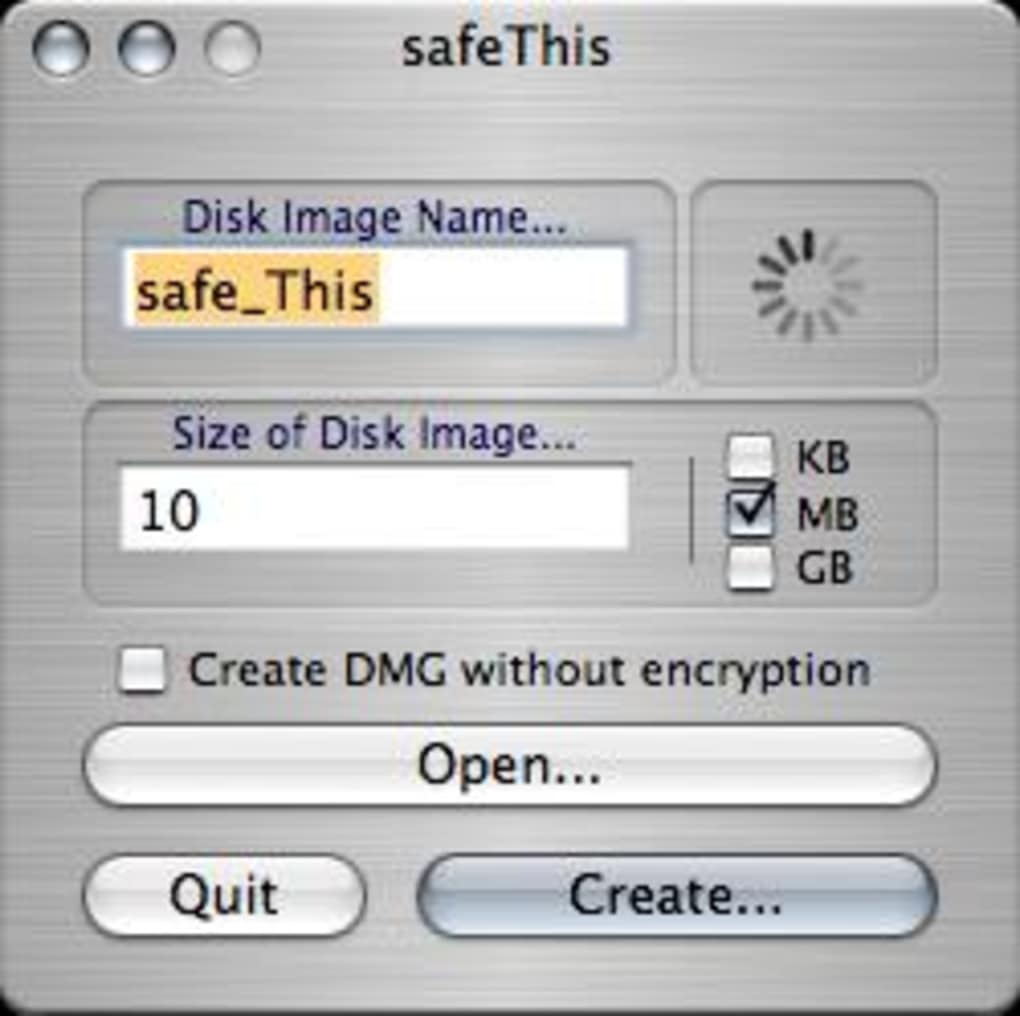
Installing safeThis is as simple as downloading the .dmg file from the official site and dragging the application icon into your /Applications folder. Because the installer is signed for macOS, you won’t encounter the typical “unidentified developer” warning, though you may need to allow the app in System Preferences → Security & Privacy** if you run a newer version of macOS that enforces stricter gatekeeping. Once installed, launch safeThis and you’ll see a clean window with three main fields: Source Folder, Destination DMG, and Password. Select the files you want to protect, specify a destination name for the DMG, set a strong password, and click “Create”. The program will compress the data, encrypt it with AES‑256, and generate a .dmg file ready for use.
Operating System Support: safeThis runs on macOS X 10.4 (Tiger) through macOS 10.14 (Mojave). While newer macOS releases (Catalina, Big Sur, Ventura, and later) have moved to 64‑bit‑only architectures, safeThis can still operate under Rosetta 2 on Apple Silicon Macs, though performance may vary. Users on legacy hardware will appreciate the program’s low memory usage, typically staying under 50 MB during encryption.
Pros
- Free and open to all macOS users.
- Strong AES‑256 encryption ensures high security.
- Intuitive drag‑and‑drop workflow reduces setup time.
- Small download size preserves disk space.
- Option to securely delete original files after encryption.
Cons
- Last updated in 2007; no modern UI refresh.
- Lacks support for newer encryption standards like ChaCha20.
- No native Windows or Linux version.
- Only available in English.
- Limited integration with cloud storage services.
FAQ & Conclusion
Is safeThis completely free or are there hidden costs?
safeThis is 100 % free. There are no subscription fees, in‑app purchases, or hidden costs. The download includes all features needed to create encrypted DMGs.
Can I use safeThis on the latest macOS versions?
Yes. safeThis works on macOS 10.4‑10.14 natively and can run on newer versions via Rosetta 2 on Apple Silicon Macs. Performance remains acceptable for typical file sizes.
What encryption algorithm does safeThis use?
The application employs AES‑256, the industry‑standard symmetric encryption algorithm known for its robustness against brute‑force attacks.
Will safeThis delete my original files after encryption?
Yes, safeThis includes an optional “Secure Delete” feature that overwrites the original files, reducing the chance of data recovery.
Is there a way to recover a forgotten password?
Unfortunately, no. The encryption is strong, and without the correct password the DMG cannot be opened. It’s crucial to store passwords safely, for example in a reputable password manager.
In summary, safeThis remains a solid choice for macOS users who need a quick, free solution to encrypt files into DMG containers. Its straightforward interface, strong AES‑256 encryption, and minimal system impact make it especially valuable for individuals and small teams operating on older hardware. While the software has not received a modern redesign, its core functionality is still relevant, and the ability to securely delete source files adds an extra layer of privacy. If you’re looking for a no‑cost utility that protects sensitive data without a steep learning curve, safeThis is worth a download. Click the button below to get the latest version and start securing your files today.
Professional Review
Pros:
- Free, no hidden fees.
- Strong AES‑256 encryption.
- Simple drag‑and‑drop workflow.
- Low system resource usage.
- Secure deletion option.
Cons:
- Last updated in 2007; UI feels dated.
- No support for newer macOS security features.
- English‑only interface.
- No Windows or Linux counterpart.
- Limited cloud integration.
Rating: 4/5 based on 27 user reviews.







